Content pillar
Trading Journal Software & AI Analysis
How to choose trading journal software: screenshot capture, AI field drafts, imports, scorecards, and when TradeLogger is the wrong tool.
Updated 2026-10-12 · TradeLogger Research
Quick answer
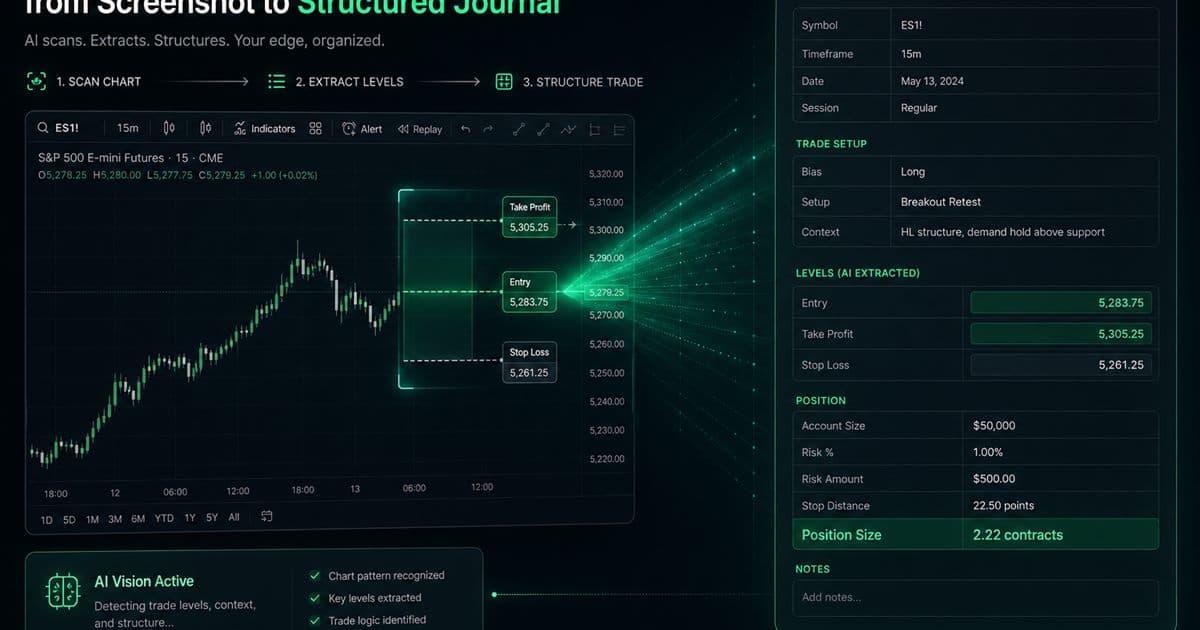
Trading journal software beats a spreadsheet when screenshots, tags, calendars, or AI drafts reduce skipped logs. The best journal is the one that captures your normal trades and produces a weekly decision. Screenshot-first tools fit chart-led discretionary work; import-first tools fit execution scale. Confirm every extracted field by hand.
This hub owns the commercial queries “trading journal software” and “best trading journal software.” The homepage carries the brand. /features is a product tour, not a keyword target. The process lives in the foundational guide to trading journals. Software is what you buy only after you know which evidence you must keep.
What is the best trading journal software?
The best trading journal software is the system that captures honest evidence when motivation is low, keeps definitions stable, and produces a review decision you can use next week. “Best” shifts with workflow: screenshots versus imports, discretionary context versus execution scale, a short review versus a research desk. Dashboard tile count is not the score.
Write down your source of truth first. For a discretionary trader it may be an annotated chart. For a high-frequency or multi-account trader it may be the broker file. For psychology work it may be pre-trade notes and behavior labels. Then score products against that source, not against a generic feature matrix.
- Screenshot-first journaling is strongest for visual context. It requires clear images and field confirmation.
- Import-first journals are strongest for execution volume and fill accuracy. They depend on broker, format, and instrument compatibility.
- A manual spreadsheet template is cheapest and most flexible. It becomes fragile once formulas and screenshots pile up.
- Deep analytics journals are strongest for research or psychology homework. They need stable definitions and consistent input.
How should you score trading journal software?
Use a 100-point scorecard so a flashy unused module cannot decide the purchase. Weight capture and review highest. Shift points toward replay or imports only if you will run those jobs every week. A tool that looks complete on a marketing page and fails your normal losing session is not the best journal for you.
- Capture reliability (25): test normal trades, partial exits, symbols, fees, time zones, and screenshots.
- Review value (25): can you compare setups, sessions, emotional states, mistakes, and calendar periods?
- Habit durability (20): time spent and skipped entries after a difficult session, not just setup day.
- Data control (10): correction, export, deletion, attachments, and historical access.
- Integrations you will actually use (10): broker, replay, prop method, or coaching workflow.
- Cost you can sustain (10): match plan limits to the features you will deploy.
Run a buying test on ten representative trades, including two losses and one messy execution. Time the capture, count corrections, and complete one weekly review. Ask whether you would run the same process after your worst normal session. If the answer is no, more features will not fix the habit.
How does TradeLogger turn a screenshot into a journal entry?
Paste a TradingView snapshot URL or upload a TradingView, MetaTrader, cTrader, or broker screenshot. Vision drafts symbol, timeframe, Long or Short, entry, stop-loss, take-profit, risk-to-reward, optional exit when a closed fill is labeled, notes, and visible order tickets. You confirm or edit before save. Setup and emotion tags are added by hand.
The product uses gpt-4.1-mini, then gpt-4.1 only if stop, entry, or take-profit is still missing. Tickets may include price, size, and P/L when those labels are visible. Size is not always a top-level field. The chart is stored with the row. Optional OANDA or cTrader connections add account context; they do not replace screenshot confirmation. See the TradeLogger app workflow and how AI analysis uses your own journal.
How is an AI trading journal different from ChatGPT?
“AI trading journal” now mixes screenshot vision that drafts fields from a chart, broker-sync tagging of imported fills, and ChatGPT-style threads. Chat is not a system of record. Broker-sync AI still treats the fill file as truth. Screenshot AI still treats the annotated chart as the decision. Score captured rows and weekly reviews, not how confident the model sounds. The dedicated split is AI trading journal vs ChatGPT.
When is a spreadsheet still the right journal?
If your process is still changing or trade volume is low, a spreadsheet is a valid journal. Keep date, symbol, direction, risk, setup, emotion, screenshot link, outcome, and lesson. Upgrade when image handling, tagging, consistency, or weekly retrieval becomes the bottleneck. Do not subscribe because a product page implies serious traders must. Start with the best free trading journal path.
What does TradeLogger cost?
TradeLogger is free to sign up. There is no free journaling plan. Journal access is $4.99/week, $34.99/year, or $69.99 lifetime. Weekly and yearly plans include a 7-day trial. Skip TradeLogger if you need broad broker automation, integrated replay, or a deep psychology lab—those jobs belong on trading journal comparisons, not on this software hub.
Guides in this cluster
- TradeLogger Trading Journal App: Workflow, Fit, and Limits
A transparent guide to TradeLogger's screenshot-first capture, editable AI extraction, tags, calendar review, best-fit users, and limitations.
- Trading Journal with Screenshots: How Chart-First Logging Works
A trading journal with screenshots keeps the chart next to the trade row. Learn when screenshot-first logging beats imports or spreadsheets, and how AI extraction fits.
- How AI-Driven Trade Analysis Can Secure Your Market Edge
You can leverage screenshot field suggestions and structured pattern review to cut down on journal friction, allowing you to properly test various possible trading edges without the trap of overselling automation.
- AI Trading Journal vs ChatGPT in 2026: Screenshot, Broker-Sync, or Chat?
ChatGPT is not a trading journal. Compare screenshot vision tools, broker-sync AI agents, and chat logs — then choose the record you can actually review.
- Trading Journal Guide: Setting Up a Review System That Endures
Learn what to record, how to choose between spreadsheets and software, and how to turn trade evidence into a practical weekly review.
Frequently asked questions
What is the best trading journal software?+
There is no universal winner. Score capture reliability, weekly review, habit durability, data control, integrations you will use, and cost you can sustain. Screenshot-first tools fit annotated charts; import-first tools fit fill files.
How does AI trading journal software read a screenshot?+
TradeLogger drafts symbol, timeframe, direction, entry, stop, take-profit, risk-to-reward, optional exit, notes, and visible order tickets. You confirm or edit before save. Setup and emotion tags are not extracted.
Does ChatGPT work as a trading journal?+
Chat can help write plans or lessons. It is not a system of record. Keep comparable trades—screenshot, tags, R, and weekly review—in a journal you can filter and export.
Is TradeLogger free trading journal software?+
No. Sign-up is free. Journal plans are $4.99/week, $34.99/year, or $69.99 lifetime, with a 7-day trial on weekly and yearly plans. There is no standalone free journaling plan.