The Screenshot-FirstAI Trading Journal
Paste a trade screenshot. TradeLogger drafts symbol, entry, exit, and size—you confirm, tag the setup, and log how you felt. Use the calendar in your weekly review to see which setups work and which habits cost you.
Free to sign up. Weekly and yearly plans include a 7-day trial at checkout—cancel before day 7 and you won't be charged.
This chart in. This journal row out.
Real screenshot in, editable journal row out. Confirm the fields, then save.
Your screenshot
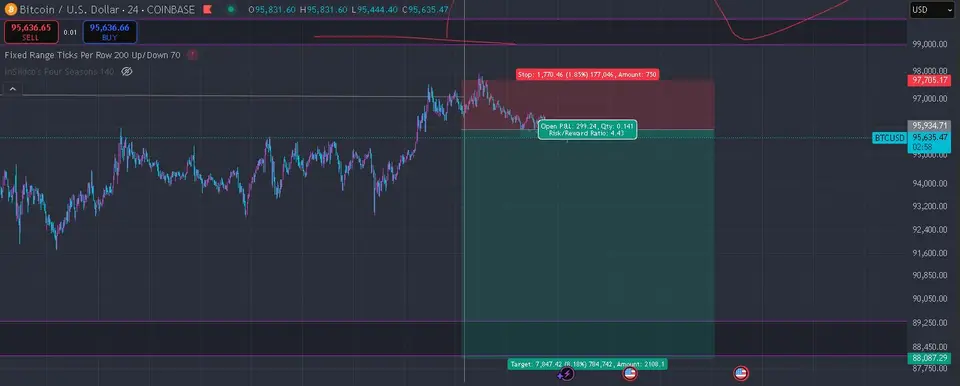
Draft journal entry
- Symbol
- BTCUSD
- Direction
- Short
- Entry
- 95,635.47
- Stop
- 97,705.17
- Target
- 88,087.29
- Size
- 0.141
- R:R
- 4.43
Edit anything that looks off, then save to your journal.
Three steps after each session
Capture with a screenshot, confirm the row, review when the session is done.
Upload the chart
TradingView, MT4/5, cTrader, or any broker—paste or upload the screenshot.
Confirm the numbers
Check symbol, direction, entry, exit, and size. Fix mistakes, then save.
See what paid
Tag setups and emotion. Use the calendar and weekly review to keep what works and cut what doesn’t.
What's waiting when you log in.
Write the rules once. Tick them before every trade.
Log the trade after the fact; check in before you click. Write your rules once, tick them before each entry.
01
Add your strategy
Setups, session, risk, invalidation—this is the practical trading framework you use, not some standardized template.
02
Check in first
Always run through your list—tick off every point you’ve written out—before you log in. If you find even a single empty box, treat that as the immediate signal to step away.
03
Keep the score honest
The system captures both on-plan and off-plan data. The Review function then shows whether you stuck strictly to the playbook, or if the trade was purely driven by impulse.
Pre-trade check-in
Strategy
London breakout
We strictly limit risk exposure to 1%. Furthermore, we never rely on a fixed stop; the trade must be stopped upon invalidation. Crucially, we do not take any trade unless the HTF confirms the setup.
- HTF bias confirms the underlying direction.
- Inside my session window
- Keep your position size at 1% or below.
- When the Stop is hit, it signals the immediate invalidation of the entire plan.
- The setup I wrote out is this—it’s not a chase.
The final box has opened. Now, either stand aside, or if the setup genuinely holds up, make the trade.
Built for the review — not the dopamine.
Logging is step one. The edge shows up in the weekly review—setups that pay, size creep after wins, and what to change next week.
See all features →Screenshot → journal entry
Upload a chart. TradeLogger extracts symbol, direction, prices, and stops—you approve, then it saves with the image attached.
Analytics from your journal
Win rate, R-multiples, drawdown, and breakdowns by setup or session—from your trades only.
Weekly pattern review
Summaries flag habits like revenge sizing, fading green days, and setups that look good but bleed.
Complete Trader Bundle (optional)
Lifetime journal plus Elite Telegram community and six months of private mentoring—if you want process coaching on top of the app.
Watch one trade logged end to end
Screenshot in, fields filled, you confirm—that's the workflow.
Pricing—7-day trial on weekly and yearly plans.
Less spreadsheet noise, more clarity
Traders use TradeLogger to see which setups to keep and which habits to drop.
“I stopped retyping prices from screenshots. AI sometimes misses a field, but fixing one cell beats building the whole row.”
“Weekly review showed I was overtrading after green days—something my spreadsheet never surfaced.”
“The fixed fields—setup, emotion, result—slow me down enough that I don't click on autopilot.”
These experiences are purely for illustration. Just remember, TradeLogger is a dedicated journaling tool, not financial advice.
Common questions about TradeLogger
Is TradeLogger free?
TradeLogger is free to sign up. Journal access requires a paid plan: $4.99 / £3.99 / €4 per week, $34.99 / £24.99 / €25 per year, or $69.99 / £49.99 / €50 lifetime (USD / GBP / EUR). Checkout also charges CAD (CA$5.99/week) and AUD (A$6.99/week) at those markets’ list rates. Weekly and yearly plans include a 7-day trial; there is no standalone free journaling plan.
What is a screenshot trading journal?
A screenshot trading journal captures your chart image along with trade data. Instead of only logging numbers, you paste a TradingView or broker screenshot, and TradeLogger extracts the symbol, entry, exit, and size using AI vision. The chart stays attached to each trade for visual context during review.
What's the best TradeZella alternative for screenshot logging?
TradeLogger focuses specifically on screenshot-first workflows with AI field extraction. While TradeZella offers broker sync and replay, TradeLogger is built for discretionary traders who rely on annotated charts as their source of truth. Both support tagging and calendar review.
How does AI trading journal extraction work?
When you upload a trade screenshot, TradeLogger runs a vision scan that drafts symbol, timeframe, direction, entry, stop, take-profit, risk-to-reward, optional exit, and notes. You confirm or edit before saving. Setup and emotion tags are added by hand.
Can I use TradeLogger for prop firm challenges?
Yes, as a personal journal. You can log FTMO-style, Topstep, or Apex evaluation trades from screenshots, tag setups, and check rule headroom with the free prop drawdown calculator. TradeLogger does not replace a firm's official dashboard or enforce that firm's rules automatically.
Does TradeLogger work with TradingView?
Yes. You can screenshot TradingView charts and paste them into TradeLogger. The AI extracts fields from the TradingView UI. There is no direct TradingView API integration—TradeLogger relies on visual capture for discretionary context.
Does TradeLogger sync OANDA or cTrader?
Yes, optionally. OANDA uses an API token you paste in TradeLogger. cTrader uses Spotware Open API OAuth at /dashboard/ctrader: it loads balance, equity, and deal P/L, and imports fills into journal rows. Neither connection captures chart context, setup tags, or emotion—confirm screenshots for those. The cTrader dashboard stays behind login and is not indexed.
Log your next trade in under five seconds
Create a free account and start from a screenshot. Upgrade when you want; weekly and yearly plans include a 7-day trial at checkout.
Create free account