Product · 5 min read
TradeLogger Trading Journal App: Workflow, Fit, and Limits
A transparent guide to TradeLogger's screenshot-first capture, editable AI extraction, tags, calendar review, best-fit users, and limitations.
Updated 2026-07-30 · TradeLogger Research
Quick answer
TradeLogger functions as a screenshot-first trading journal, specifically built for discretionary traders. It pulls out proposed fields directly from a chart image, allowing the trade row to remain fully editable, while also letting you add setup and emotion tags, plus it supports calendar review. Just to be clear, though, it isn't built as a universal broker-import, replay, or comprehensive deep-analytics suite.
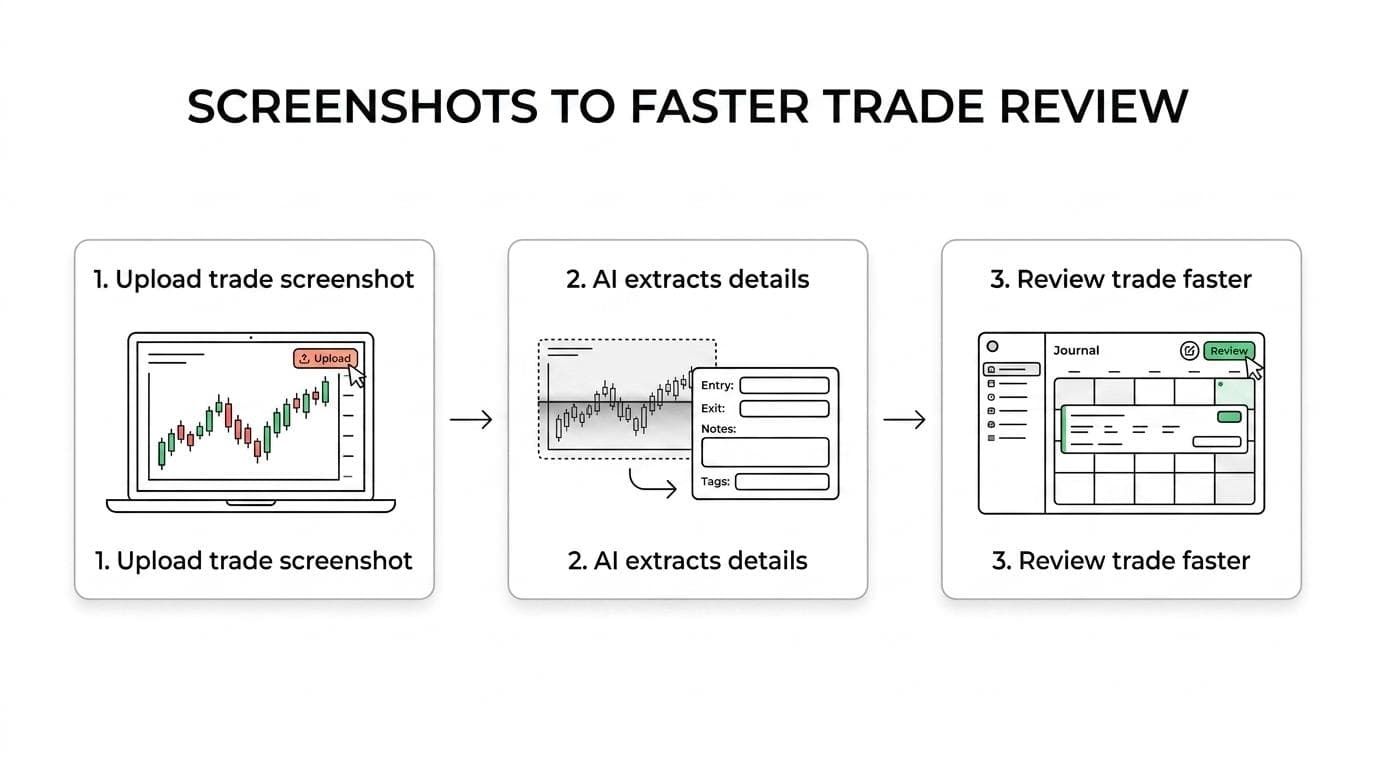
TradeLogger is a screenshot-first trading journal: you snap a chart after the trade, vision drafts fields, you confirm the row, then tag and review in calendar. It is not a universal importer, replay suite, or deep-analytics lab. Process hub: foundational guide to trading journals. Category hub: AI-powered trading journal software and platforms.
How does the TradeLogger screenshot workflow work?
- Upload a TradingView snapshot URL or a TradingView, MetaTrader, cTrader, or broker screenshot.
- Review drafted fields: symbol, timeframe, Long or Short, entry, stop-loss, take-profit, risk-to-reward, optional exit, notes, and visible order tickets.
- Confirm or edit the row. Setup and emotion tags are added by hand.
- Save; the chart stays attached.
- Review later by calendar and tag.
The core concept is this: extraction is designed to assist your verification process, but it absolutely does not replace it. Why the distinction? Because screenshots are inherently varied—they can differ based on resolution, theme, crop, chart layout, annotations, and visible labels. Given all that variability, the resulting proposed symbol, direction, price, or time can easily be wrong, or completely absent. You must correct the row before you treat that information as analysis-ready data.
What does a screenshot-first capture actually preserve?
Broker statements certainly prove execution occurred, but they frequently miss the visual context behind a discretionary choice. A chart, however, retains vital information: it captures location within a specific range, adjacent market structure, volatility levels, marked levels, and the trader's personal notes. By linking that image to specific tags, you can review not merely what transpired, but also the trader's original belief about the market's movement.
TradeLogger is really helpful when you're asking process questions. For instance, did your rule breaks tend to cluster within a single session? Or, did those FOMO-tagged trades exhibit a specific visual pattern? And were the losses you incurred legitimate setups, or just low-quality imitations? Those deeper questions, however, still demand human insight. It's crucial that the tags remain consistent, and frankly, a small sample size should only lead to generating hypotheses—not to confident, sweeping conclusions.
How do tags and calendar review work in TradeLogger?
Tags help you transform raw trade narratives into specific, revisitable categories. The most effective taxonomy should be deliberately minimal: a stable setup name, the session, a recorded emotional or decision state, and maybe a single mistake label. Using synonyms—such as “fear,” “nervous,” or “hesitant”—can fragment your sample data. Therefore, you must choose controlled terms that are defined and long enough to allow for genuine comparison.
The calendar naturally sets up a rhythm for review. As you go through the week, scan for any trades you missed, look at unusual outcomes, compare repeated tags, and ultimately commit to one process adjustment. Remember, simply archiving a screenshot isn't valuable in itself. Its true value appears when you can pull it up and retrieve it alongside similar past decisions.
Who is TradeLogger a strong fit for?
- For discretionary day or swing traders—especially those who routinely save their chart screenshots.
- It happens often: traders ditch their trading journals simply because filling out the blank forms feels like too much overhead.
- Users needing an editable structure—not opaque, completely automatic AI output.
- Traders, or perhaps coaches, typically review market setups, emotional discipline, and specific calendar periods.
Who should choose a different trading journal?
TradeLogger isn't the perfect fit for every trader out there. For instance, high-volume traders often need something with mature broker imports and robust execution reporting. If your focus is on needing integrated market replay, deep prop-firm synchronization, or just a genuinely broad all-in-one suite, you might want to check out products specifically built for those jobs. People who are looking to do deep psychology homework or highly customized research, however, might find a more demanding analytics journal works better for them.
If you aren't capturing screenshots, won't verify extracted fields, or skip reviewing tags, this tool is also a poor fit. When that happens, you'll find that a simple spreadsheet or an import-led tool might generate a much more reliable record.
How should you evaluate the TradeLogger app?
- You need ten standard screenshots. Make sure to capture them all—this includes dark themes, annotations, instances of losses, and every partial exit.
- We need to track the total duration, starting with the initial upload and running all the way until the row is corrected and tagged.
- Document precisely which fields require repeat corrections or manual completion.
- Commit to a weekly review. You must verify whether the tags are delivering one genuinely useful question or a concrete action item.
- When evaluating options, you must compare the current pricing and limits against alternative providers, basing the analysis on the exact same real trades.
TradeLogger addresses a very specific use case: taking visual trade evidence and converting it into a corrected, tagged record, all while minimizing that usual blank-form friction. If that precise bottleneck is slowing you down, you should test it out. However, if your core focus is on imports, replay, or deep research, you’ll want to look for a solution that fits that requirement instead.
Frequently asked questions
Who specifically is TradeLogger meant to serve?+
This is primarily built for discretionary day and swing traders. They often start their review process by looking at chart or broker screenshots, and they need a way to develop a structured calendar and tagging habit.
Is TradeLogger's AI truly always reliable when extracting trades correctly?+
No. Even though Extraction suggests fields, it is prone to errors because screenshots vary widely. However, the trade row remains editable. This means the trader can always verify and correct the record before they decide to rely on it.
Does TradeLogger function as a replacement for either traditional broker imports or the existing trade replay functionality?+
It doesn't cover everything. Primarily, this tool focuses on screenshot-first journaling. If you are a trader who needs wide-ranging automated imports or integrated replay functionality, you ought to check out specialist or broader suite alternatives.
What does TradeLogger cost?+
Sign-up is free. There is no free journaling plan. Journal access is $4.99/week, $34.99/year, or $69.99 lifetime, with a 7-day trial on weekly and yearly plans. Confirm live checkout on the pricing page.
Related guides
- Trading Journal Guide: Setting Up a Review System That Endures
Learn what to record, how to choose between spreadsheets and software, and how to turn trade evidence into a practical weekly review.
- How AI-Driven Trade Analysis Can Secure Your Market Edge
You can leverage screenshot field suggestions and structured pattern review to cut down on journal friction, allowing you to properly test various possible trading edges without the trap of overselling automation.
- TradeLogger vs TradeZella: Focused Journal or Broader Suite?
Let’s put TradeLogger's screenshot-first journal side-by-side with TradeZella, considering its modern dashboard, replay capabilities, imports, and wider trading workflow.
- How to Review a Trading Journal Weekly
A weekly review checklist, designed for 30–60 minutes, that converts your trade logs into specific rules for the following week.
- Trading Journal with Screenshots: How Chart-First Logging Works
A trading journal with screenshots keeps the chart next to the trade row. Learn when screenshot-first logging beats imports or spreadsheets, and how AI extraction fits.
- AI Trading Journal vs ChatGPT in 2026: Screenshot, Broker-Sync, or Chat?
ChatGPT is not a trading journal. Compare screenshot vision tools, broker-sync AI agents, and chat logs — then choose the record you can actually review.
Try the complete loop
Upload one representative screenshot, correct the proposed fields, add your normal tags, and decide whether the review workflow fits.
Try TradeLogger