AI · 8 min read
AI Trading Journal vs ChatGPT in 2026: Screenshot, Broker-Sync, or Chat?
ChatGPT is not a trading journal. Compare screenshot vision tools, broker-sync AI agents, and chat logs — then choose the record you can actually review.
Updated 2026-08-15 · TradeLogger Research
Quick answer
I suggest leveraging ChatGPT or Claude when you need to think things out loud. Additionally, make sure to use a journal specifically for storing comparable trades. Looking ahead to 2026, the useful split for these tools is this: employ screenshot-vision journals for chart-led discretionary work, use broker-sync AI for generating fill-accurate execution logs, and confine chat threads strictly to scratch notes—never allow them to become your system of record.
“AI trading journal” search results mix broker-sync tagging agents, screenshot tools that draft fields from a chart, and ChatGPT threads of session notes. They are not interchangeable. The journal that works captures your source of truth and still answers a weekly question after a losing day. Category hub: AI-powered trading journal software and platforms. Process hub: foundational guide to trading journals.
Think of ChatGPT as a conceptual thinking partner—it's not designed to be your definitive system of record.
A large language model excels at transforming messy notes into coherent language. However, it is a dreadful database. Chat threads aren't queryable by specific setup, session, or R. They don't hold the actual screenshot that justified the entry. They don't persist across a new device, a forgotten chat, or a model that has lost the initial context. If you ask, "what is my win rate on London breakouts?", the model can only respond if you re-paste the data—and even then, it might still invent a neat summary.
- Use ChatGPT or Claude before the session: write the plan in plain language.
- This is critical post-session. Use them to distill that disorganized paragraph down to one single, actionable lesson.
- Don't use these for live trading. Seriously. You'll find zero stable schema, no trustworthy export, and certainly no playbook table.
- Even if you copy and paste trade fills right into the chat, you absolutely have to log a journal row—complete with a screenshot, tags, and the final result. Otherwise, next week's review session is going to be based purely on shaky memory.
That same caution holds true if you try to "build a journal in Notion with AI." Custom databases might actually work for researchers, provided they commit to maintaining the properties. However, most discretionary traders toss these systems after the first busy week because the capture process takes longer than the session itself.
The 2026 AI journal map
Journaling the visual data from trading screenshots.
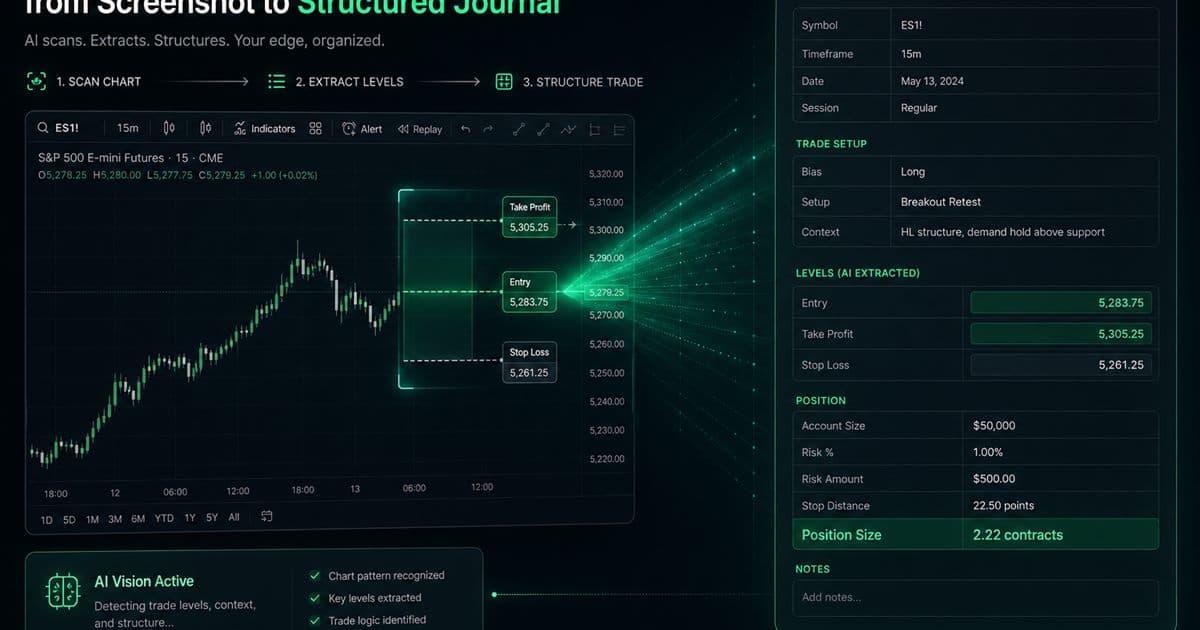
These tools process the chart image as the primary input. When you snip a screen from TradingView, MT4, or any broker platform, the model generates suggestions for the symbol, direction, key levels, or a full written analysis of the chart structure. This specific category exists solely because discretionary traders make decisions based on what they see on the screen—not simply from a historical fill file. TradeLogger fits right into this grouping: the screenshot itself turns into a preliminary, editable trade row. More recent, screenshot-native products also offer automated "reads" of structure and conversational chat personas. The commonality here is vision. The distinction, however, lies in whether the generated output is an editable journal entry or merely a commentary overlay.
The upside is that this tool functions across any platform capable of being screenshotted, which means it successfully retains the specific visual context you used during the process. However, you need to be aware of a limitation: the image itself is not the fill. Keep in mind that if you have planned lines, multiple price labels, or missing size details, the system can result in inaccurate drafts unless you manually confirm those elements.
2. Broker-sync AI and the handling of imported fills.
Tools like TradeZella, TraderSync, and Tradervue-class suites rely on execution data—whether that comes from broker connections, CSV files, or platform imports. Once the data is in, AI can tag entries, write out session reviews, or answer specific questions using that resulting table. This setup is ideal when you generate numerous fills and treat the PnL file as the absolute source of truth. However, this architecture fails badly if the rationale behind the trade exists only on an annotated chart that never made it into the import process.
The upside here is that the modeling of fees, timestamps, and size is much closer to actual broker reality; plus, volume scales correctly. The catch, though, is that you still need to manually attach screenshots and specify intent. If you don't, the AI is just analyzing outcomes, completely missing the actual decision-making process. Keep in mind that if your tag definitions are sloppy, autonomous agents that are tasked with tagging every trade could end up encoding a bad rule at scale.
3. Coaching via chat, supported by a dedicated journal.
The 'third wave' approach—logging entries in plain English or using Telegram and then storing a row linked to the conversation—can genuinely decrease form friction. However, it completely fails if the conversation itself becomes the primary product and the structured data table is merely an afterthought. You're missing critical components: no comparable R, no screenshot, and no weekly playbook. If you can't actually filter for things like "this setup, last 20 closed trades, average R," then what you have isn't a proper journal. It's just a chat log with unnecessary extra steps.
Stop fixating on 'AI features.' Let's discuss the actual metrics you need to evaluate instead.
Don't let the marketing hype convince you that the model will simply locate your trading edge. After a "red session," you must score and refine the workflow you intend to replicate.
- When tracking execution, can you actually record that trade within a minute, pulling the data straight from your live screen or your broker file?
- Can we make the necessary corrections—say, adjusting a wrong symbol, a faulty fill, or an incorrect size—without having to battle the automation itself?
- Quick question here: When we talk about context, is the screenshot or the note tied right into the row itself, or is that information sitting in some other, separate chat?
- Can you pull this data, grouping it by setup, and then show me the corresponding win rate, average R, and sample size?
- Let's review this: Can the weekly pass be configured to deliver just one rule, rather than a full 20-page report?
- If the product parameters change, can the export still deliver the data in CSV format?
TradeLogger’s Review playbook is designed specifically for that crucial comparison step. You can analyze expectancy by setup, by week, or across all-time performance, and the platform keeps the sample size visible. This detail is key, because it stops a quick three-trade "hot streak" from ever misleading you into thinking you have a genuine edge. This is the precise antithesis of some chatbot that just sounds overly confident.
A sensible division for the majority of discretionary traders.
- If you're a chart-led day or swing trader, your primary record should be a screenshot-first journal. Beyond that, utilizing ChatGPT for drafting your weekly lesson remains an optional approach.
- If you're handling high-volume or multi-account execution, always use the broker-sync journal to maintain your record. Don't forget to attach screenshots specifically to the trades that you intend to review.
- The Prop challenge mirrors your source of truth, but it also incorporates daily loss and rule-break tags. Always remember this: AI summaries simply cannot replace the firm’s official dashboard.
- Hobbyist testing ideas: honestly, a simple spreadsheet still outperforms some overly complex AI suite you'll never actually run.
How do you test TradeLogger without accidentally mistaking it for a signal bot?
- Share an actual chart from a recent trade you took—and make sure it includes a loss.
- Accept or correct every suggested field. Note what the model missed.
- Be sure to include the exact setup name you utilized, along with the specific emotional state you experienced when initiating the trade.
- Always close the trade as soon as you've confirmed either your result or your R target.
- You need to wait until you've gathered a meaningful sample before you even start looking at the setup's win rate or the average R within Open Review.
If you find yourself needing major corrections just to make the field suggestions work on your typical screenshots, then this product simply won't fit your needs. That's the same issue you run into when a broker importer drops your instrument. Ultimately, suitability comes down to the capture quality, not how much hype the homepage generates about being "AI."
Frequently asked questions
Can ChatGPT truly replace a trading journal?+
No. While a chat system can certainly summarize text you feed it, it fundamentally fails to maintain a structured, exportable history. It lacks the stability needed for tracking key elements like setup tags, R multiples, screenshots, or establishing a proper weekly review path. Beyond that, threads simply drift, getting forgotten over time. If you ask it, "what is my expectancy on this setup?", it can't provide an answer unless you manually reconstruct the entire dataset first.
For 2026, what exactly defines an AI trading journal?+
Three distinct types of products all carry the same label. These include screenshot-vision tools, which draft fields directly from a chart image; broker-sync platforms, designed to import fills and then run AI tagging or session reviews; and chat-style coaches that analyze your trading history. Because they address such different kinds of capture challenges, it's critical to remember they shouldn't be lumped together in a single category.
Will the AI derived from a screenshot actually be accurate enough to bypass the editing phase?+
Listen up. A chart image might only display planned levels, never the actual fills. It could also obscure crucial details like fees, partials, and total size, and remember that vision models sometimes misread labels entirely. Because of this, always treat any extracted fields as nothing more than a working draft. The trading journal only truly becomes valuable once you manually confirm the row.
Which approach is better: TradeZella-style AI agents, or simply tracking trades using a screenshot journal?+
If execution volume and fill accuracy are the definitive source of truth, you should choose broker-sync AI. However, if the annotated chart serves as your primary decision record—and you know a standard broker import would lose that critical context—then opt for a screenshot-first journal. It is common for traders to require both approaches: imports for calculating PnL, while screenshots preserve the underlying reason the trade was made.
Can AI, analyzing journal data, automatically uncover a profitable edge?+
Pattern summaries and the insights derived from chat logs are only hypotheses. These claims can easily be inaccurate, stemming either from ridiculously tiny sample sizes or simply being fitted to random noise. For a review to be considered truly robust, however, you still need to inspect the screenshots, the sample size, the average R value, and verify whether you stuck strictly to the original plan.
Related guides
- How AI-Driven Trade Analysis Can Secure Your Market Edge
You can leverage screenshot field suggestions and structured pattern review to cut down on journal friction, allowing you to properly test various possible trading edges without the trap of overselling automation.
- Trading Journal Guide: Setting Up a Review System That Endures
Learn what to record, how to choose between spreadsheets and software, and how to turn trade evidence into a practical weekly review.
- TradeLogger Trading Journal App: Workflow, Fit, and Limits
A transparent guide to TradeLogger's screenshot-first capture, editable AI extraction, tags, calendar review, best-fit users, and limitations.
- How to Review a Trading Journal Weekly
A weekly review checklist, designed for 30–60 minutes, that converts your trade logs into specific rules for the following week.
- Trading Journal with Screenshots: How Chart-First Logging Works
A trading journal with screenshots keeps the chart next to the trade row. Learn when screenshot-first logging beats imports or spreadsheets, and how AI extraction fits.
Keep the screenshot. Edit the draft.
Paste a chart, confirm the fields, and review setups by win rate and average R — not by a chat that sounds confident.
Start free