Compare · 5 min read
TradeLogger vs TradeZella: Focused Journal or Broader Suite?
Let’s put TradeLogger's screenshot-first journal side-by-side with TradeZella, considering its modern dashboard, replay capabilities, imports, and wider trading workflow.
Updated 2026-10-08 · TradeLogger Research
Quick answer
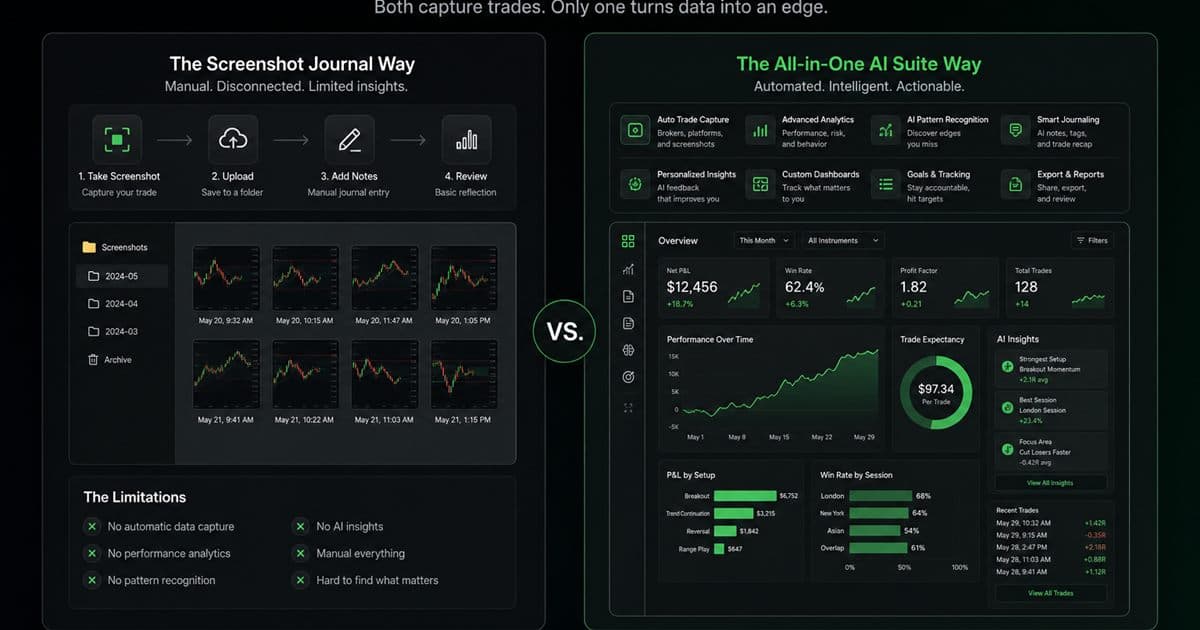
If you are looking for a highly focused, screenshot-first discretionary journal, TradeLogger is your pick. However, if your routine demands a broader modern suite—including features like broker imports, replay, dashboards, or supported prop-firm synchronization—you should opt for TradeZella.
TradeLogger and TradeZella are both online trading journals with different jobs. TradeLogger is a screenshot-first discretionary journal. TradeZella is a broader suite: dashboard, broker imports, replay, and supported prop-firm sync. Choose focus versus breadth. Process context sits in the foundational guide to trading journals. Named alternatives live with head-to-head trading journal comparisons.
How does TradeLogger turn a screenshot into a journal entry?
Upload a TradingView, MetaTrader, or broker screenshot, or paste a TradingView snapshot URL. Vision drafts symbol, timeframe, Long or Short, entry, stop-loss, take-profit, risk-to-reward, optional exit, notes, and visible order tickets. You confirm or edit before save. Setup and emotion tags are entered by hand. The chart stays on the row. TradeZella’s replay and import jobs are separate; verify them on TradeZella.com.
Which jobs should you score before counting features?
When a suite offers several modules that replace separate tools, it can genuinely be excellent value. However, be cautious: it might also balloon into an expensive dashboard you only end up using to log trades. Seriously, write down the specific jobs you handle every week. Are you importing executions? Attaching charts? Replaying sessions? Comparing accounts? Reviewing prop evaluations? Tagging psychology? Or perhaps preparing a coaching review? A feature only makes the cut if it actively supports one of those essential, recurring tasks.
TradeLogger really tightens up the workflow. You start with a screenshot, extraction suggests a structure, the trader adjusts the row, tags provide meaning, and the calendar helps with review. On the other hand, TradeZella tries to put more of the trading-improvement process into one single spot. Frankly, both ways of doing it make sense; the real waste comes from buying into broad functionality you never use, or accepting a narrow system that forces you into endless workarounds.
| Feature | TradeLogger | TradeZella |
|---|---|---|
| Product shape | Focused screenshot-first journal | Broader suite with dashboard, replay, and imports |
| Primary capture | Screenshot with AI field extraction you confirm | Broker imports and supported platform sync |
| Replay | Not a replay suite — post-trade screenshot review | Integrated trade replay is a core suite job |
| Prop-firm workflows | Personal journal plus a free drawdown calculator | Supported prop-firm sync on their current product pages |
| Best for | Chart-led discretionary review with tags and calendar | Traders who will use replay, imports, or suite modules weekly |
| TradeLogger pricing | .99/week, .99/year, or .99 lifetime | Not listed here — confirm current TradeZella plans on their site |
TradeZella features, integrations, and pricing change. Verify current details on TradeZella.com
When does TradeLogger fit better than TradeZella?
- For definitive proof, you must always reference either an annotated chart or a direct broker screenshot.
- You're looking for AI support that cuts down on manual entry and keystrokes, yet you simultaneously need the ability to rigorously verify all the fields that the system extracts.
- The real weight lies in the setup and emotion tags; a massive module catalog simply can't compensate for those.
- Your review process hinges on two things: the calendar, and a weekly deep dive into the decisions you made at your own discretion.
The focused design simplifies evaluation. You need to check if the image quickly becomes a correct, useful trade row, and if you can retrieve comparable decisions at a later time. It is important to note that this doesn't claim to eliminate manual review. Extraction quality fluctuates based on the image clarity and the layout, and screenshots won't capture every execution detail that a thorough, clean broker import supplies.
When does TradeZella fit better than TradeLogger?
TradeZella should be considered for traders who appreciate a modern, polished dashboard and want journaling functionality integrated with wider capabilities. Replay helps users revisit market movement, and broker imports reduce the necessary entry work when the connection or file is supported. Prop traders may particularly value the inclusion of supported synchronization and account-level workflows. These features represent significant advantages if they align with your actual trading stack.
We still need to thoroughly verify the integration's scope. Remember, "Broker support" isn't universal; it changes depending on the asset, platform, region, account type, or the import method you use. Make sure you test partial fills, fees, options structures, futures contracts, and time zones. If you're running prop workflows, you absolutely must confirm the specific firm. Furthermore, double-check that historical data, multiple accounts, and resets perform exactly as you expect.
How should you score TradeLogger vs TradeZella?
- Let's assign 30 points to capture reliability. The critical question remains: are your standard trades capable of entering accurately, even when accounting for tolerable corrections?
- For the weekly review (25 points), the critical question is: were you able to address your top three process questions?
- Assign 20 points for must-have modules. However, you should only include replay or prop sync in your count if those features are used consistently and regularly.
- Factor habit friction at 15 points. This score must account for the time spent setting up, the effort involved in tagging, and any logs that were skipped.
- Assess sustainable cost by awarding 10 points. When calculating this, focus the comparison on the actual current plans versus the anticipated annual usage, ignoring any promotional impressions entirely.
When assessing each product, you have to grade it based on a realistic trial. For documentation, incorporate a multi-exit trade, a losing session, and provide a screenshot featuring your usual annotations. Keep in mind that a tool which appears impressive using only sample data can behave quite differently when dealing with your actual broker timestamps, symbols, and chart layout.
When should you not choose TradeLogger?
If you rely on integrated replay, demand automated imports across your accounts, or if supported prop-firm synchronization is critical to your workflow, you should skip TradeLogger. TradeZella is far better suited to meet that larger set of demands. Furthermore, if you simply don't save visual context, you should also avoid TradeLogger; its screenshot-first advantage would otherwise go mostly unused.
When does a focused screenshot journal win?
The most successful product narrows its scope when it eliminates the specific friction preventing you from journaling consistently. If your existing charts already track the setup, invalidation, and decision context, converting that data into editable records often provides more value than introducing replay or any other performance dashboard. Keep in mind that focus isn't inherently cheaper or better; it is only truly effective when it aligns perfectly with the task at hand.
For a broader suite of features—including import, replay, dashboard, and prop workflow capabilities—my practical advice is to investigate TradeZella. Conversely, if your primary focus is ensuring fast continuity from screenshot capture to review, you should test TradeLogger. Ultimately, make your final decision by referencing live product data and analyzing your own trades.
Frequently asked questions
Does TradeLogger copy every TradeZella feature?+
Listen, TradeLogger is designed specifically around a few things: screenshot capture, editable extraction, tagging, and calendar review. Don't treat it like it's meant to be a feature-for-feature replacement for some massive, broader suite.
Which journal is better for trade replay?+
If you need integrated replay capabilities, TradeZella emerges as the more robust option for your shortlist. TradeLogger, on the other hand, focuses primarily on post-trade screenshot journaling, meaning it isn't designed as a comprehensive, all-in-one replay suite.
Which journal is better for prop-firm accounts?+
TradeZella facilitates both broker import and supported prop-firm synchronization workflows. Just make sure you verify your specific firm, the platform, your account type, and all current limits before you buy—support can really vary depending on the situation.
Which journal is simpler for screenshot traders?+
TradeLogger is designed to be intentionally narrower. If your usual evidence is a chart screenshot and all you truly need are tags plus a weekly review, this focus results in less initial setup and fewer unused modules.
What's the best TradeZella alternative for screenshot logging?+
If screenshot logging is the job, TradeLogger is a focused alternative: paste a chart, confirm extracted fields, tag, and review in calendar. TradeZella remains the broader suite when you need replay or supported prop-firm sync. Confirm current TradeZella features on TradeZella.com.
Related guides
- Trading Journal Guide: Setting Up a Review System That Endures
Learn what to record, how to choose between spreadsheets and software, and how to turn trade evidence into a practical weekly review.
- TradeLogger Trading Journal App: Workflow, Fit, and Limits
A transparent guide to TradeLogger's screenshot-first capture, editable AI extraction, tags, calendar review, best-fit users, and limitations.
- TradeLogger vs Edgewonk: Screenshot Speed or Deeper Homework?
Compare TradeLogger and Edgewonk by capture friction, psychology work, analytics depth, and the type of trader each journal serves.
- TradeZella Alternative for Screenshot Logging
Looking for a TradeZella alternative? Compare a focused screenshot-first journal with a broader replay-and-import suite, and pick the job you will actually do weekly.
- TradeLogger vs Tradervue: Which Journal Fits Your Workflow?
We’re running an honest comparison between TradeLogger and Tradervue—a detailed look specifically for discretionary traders who rely on screenshots, as well as those who operate using imported data.
Cross-reference this directly against your own charting data.
Try one representative screenshot in TradeLogger and decide whether the focused workflow covers the review job you actually repeat.
Try TradeLogger