Compare · 6 min read
TradeZella Alternative for Screenshot Logging
Looking for a TradeZella alternative? Compare a focused screenshot-first journal with a broader replay-and-import suite, and pick the job you will actually do weekly.
Updated 2026-10-08 · TradeLogger Research
Quick answer
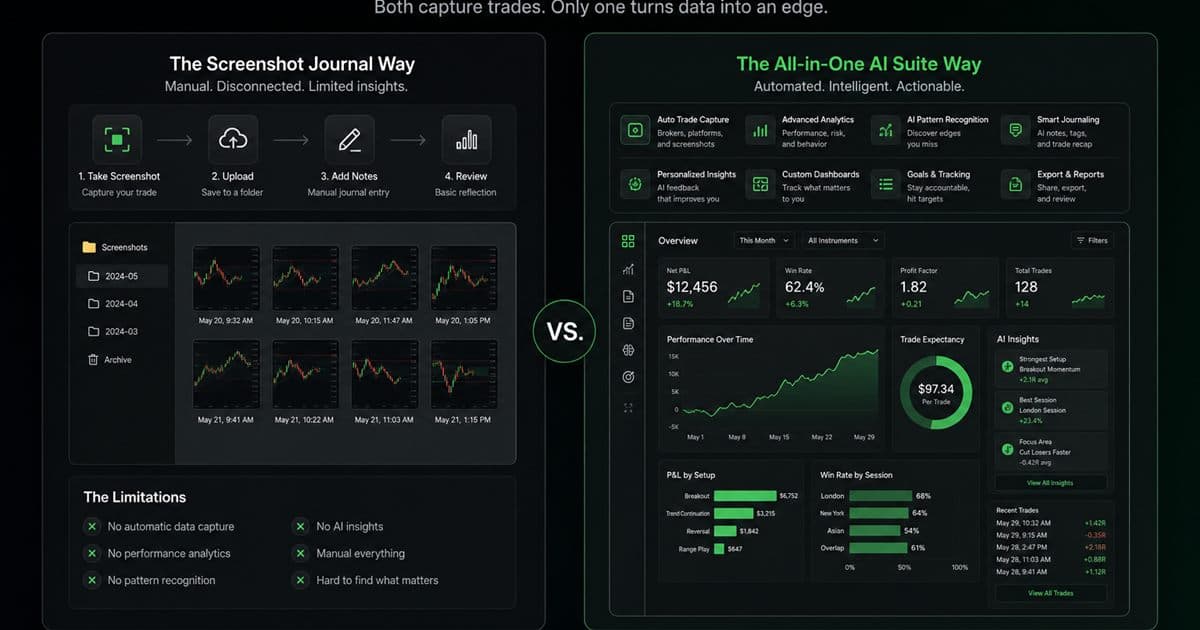
The best TradeZella alternative for screenshot logging is a journal built around the chart image, not a feature-for-feature clone of the suite. TradeLogger extracts fields from a screenshot, you confirm the row, then tag and review in calendar. TradeZella remains the broader product when you need replay, broker imports, or supported prop-firm sync. Confirm current TradeZella details on TradeZella.com. TradeLogger is free to sign up; plans are $4.99/week, $34.99/year, or $69.99 lifetime.
Traders search for a TradeZella alternative when the suite is more product than they will operate after a losing day, or when the missing job is screenshot capture rather than replay. This page is that job: screenshot logging. It is not a claim that TradeLogger replaces every TradeZella module. Broader context: the foundational guide to trading journals and head-to-head trading journal comparisons.
How does TradeLogger turn a screenshot into a journal entry?
Paste a TradingView snapshot or upload a chart. Vision drafts symbol, timeframe, direction, entry, stop, take-profit, risk-to-reward, optional exit, notes, and visible order tickets. You confirm or edit before save. Tags are added by hand. Replay and universal broker import are not in this loop—those remain suite jobs to verify on TradeZella.com.
What's the best TradeZella alternative for screenshot logging?
Pick the tool whose capture method matches your evidence. If you already screenshot the chart, a screenshot-first journal removes the blank form. If you already export fills or need to replay price, a broader suite can be the shorter path. Write the weekly job first, then shortlist.
| Weekly job | TradeLogger | TradeZella |
|---|---|---|
| Log from a chart screenshot | Primary workflow with AI draft fields | Not the product's primary wedge—confirm current capture options on their site |
| Replay the session | Not included | Core suite capability |
| Import many broker fills | Optional OANDA/cTrader context, not a universal importer | Broker imports on supported platforms |
| Personal discretionary review | Tags, emotion, calendar | Dashboards plus other modules you must actually open |
Verify current TradeZella modules and pricing on TradeZella.com
When is TradeLogger the better TradeZella alternative?
- The annotated chart is the record you trust.
- You want extraction to draft fields, then you will correct them.
- You will review tags and calendar weekly, not a catalog of unused modules.
When should you stay with TradeZella or another suite?
- Replay is part of every review.
- You need a supported prop-firm or broker sync that TradeLogger does not offer.
- You already live in an import-led reporting workflow.
For a longer side-by-side of the two products, read the TradeLogger vs TradeZella comparison. For the screenshot workflow itself, read the trading journal with screenshots guide.
Frequently asked questions
What's the best TradeZella alternative for screenshot logging?+
If the job is capturing annotated charts quickly, TradeLogger is built for that loop. If the job is replay, multi-broker import, or suite dashboards, stay with TradeZella or another import-led product and verify support on their site.
Is TradeLogger free?+
TradeLogger is free to sign up. Journal access is $4.99/week, $34.99/year, or $69.99 lifetime, with a 7-day trial on weekly and yearly plans. There is no standalone free journaling plan.
Does TradeLogger include trade replay?+
No. TradeLogger is a post-trade screenshot journal. Replay is a TradeZella-style suite job. Do not pick TradeLogger expecting integrated replay.
Is TradeLogger cheaper than TradeZella?+
TradeLogger prices are $4.99/week, $34.99/year, or $69.99 lifetime. TradeZella plans change. Compare live checkout pages for the features you will use, not a screenshot of an old price.
Related guides
- TradeLogger vs TradeZella: Focused Journal or Broader Suite?
Let’s put TradeLogger's screenshot-first journal side-by-side with TradeZella, considering its modern dashboard, replay capabilities, imports, and wider trading workflow.
- Trading Journal with Screenshots: How Chart-First Logging Works
A trading journal with screenshots keeps the chart next to the trade row. Learn when screenshot-first logging beats imports or spreadsheets, and how AI extraction fits.
- Trading Journal Guide: Setting Up a Review System That Endures
Learn what to record, how to choose between spreadsheets and software, and how to turn trade evidence into a practical weekly review.
- Trading Journal Guide: Setting Up a Review System That Endures
Learn what to record, how to choose between spreadsheets and software, and how to turn trade evidence into a practical weekly review.
- TradeLogger vs Edgewonk: Screenshot Speed or Deeper Homework?
Compare TradeLogger and Edgewonk by capture friction, psychology work, analytics depth, and the type of trader each journal serves.
- TradeLogger vs Tradervue: Which Journal Fits Your Workflow?
We’re running an honest comparison between TradeLogger and Tradervue—a detailed look specifically for discretionary traders who rely on screenshots, as well as those who operate using imported data.
Try the screenshot loop
If replay is not the job, log one representative trade from a chart screenshot and see whether the review path is enough.
Try TradeLogger