Prop firms · 5 min read
Prop Firm Trading Journal: Track Rules Before You Blow Up
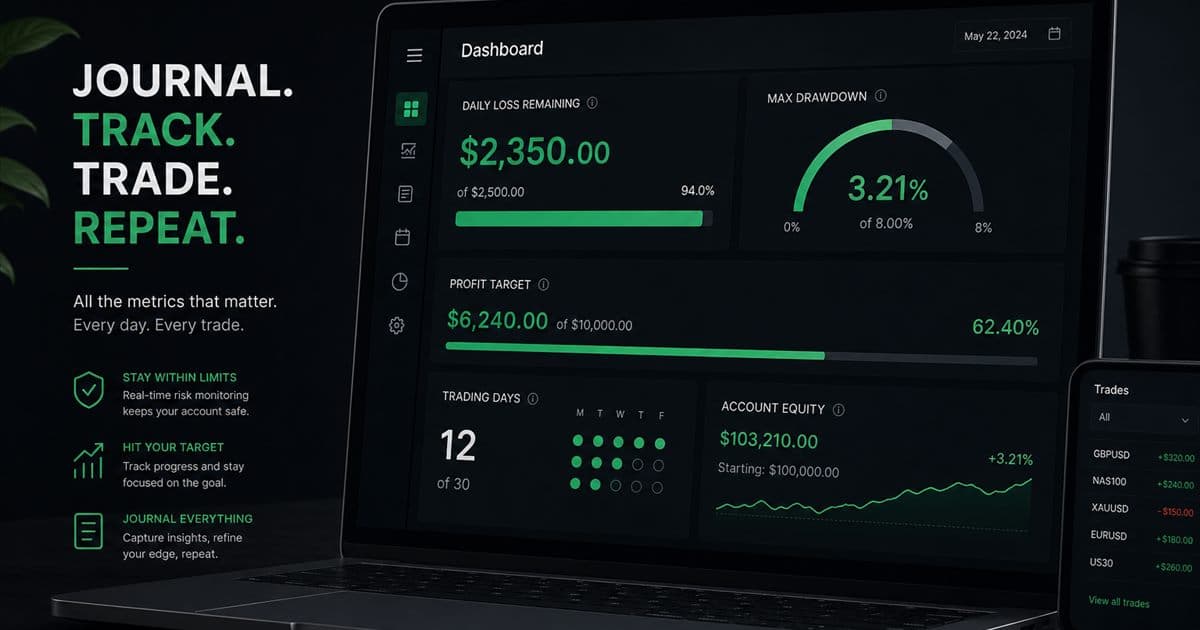
Tracking your progress during proprietary firm challenges requires disciplined journaling. You must rigorously track daily loss, maximum drawdown, profit targets, and the number of trading days.
Updated 2026-07-30 · TradeLogger Research
Quick answer
A prop firm trading journal is designed to track your rule headroom, monitoring metrics like daily loss remaining, max drawdown, profit target, and the allowed trading days. Crucially, it also records the setup and the emotional state surrounding every single trade.
A prop firm trading journal tracks decision quality and how those decisions consume evaluation limits. Daily loss and max drawdown usually matter more than the next profit target. Official calculations live on the firm’s dashboard. Your journal is the personal record beside it. Cluster hub: passing prop firm evaluation rules with journals. Process hub: foundational guide to trading journals.
How should you track prop firm drawdown headroom?
When you begin any session, you have to convert the official account rules into the remaining room limit. Don't just rely on your current balance—it's not enough. The true limit can be skewed by a number of things, such as open losses, commissions, when the daily reset happens, or even the specific calculation method the firm uses. Make sure you log both the figure shown on the dashboard and your own, more restrictive stop level.
- What is left of the daily loss buffer before we hit the firm's maximum limit.
- The concept of Maximum-drawdown headroom defines the ultimate buffer space before losses hit your critical limit.
- Let's talk about the risk exposure created when you spread positions across correlated markets.
- Driving progress with profit objectives.
- Identifying the required trading days, or perhaps tackling other active objectives.
- For a personalized session stop, you might employ a smaller R limit.
Placing your personal stop order within the official boundary helps cushion against poor execution and flawed decisions. Remember, this setup doesn't guarantee you won't face a breach. It’s crucial to align the official values directly with the prop firm’s tools, particularly when dealing with day boundaries or any open positions.
What should a prop firm trading journal record besides P&L?
Any effective prop journal entry should begin with a clear screenshot of the setup. You need enough visual context there so that the reader can properly judge the underlying trade idea. After that, be sure to confirm the entry, exit, direction, size, and the final result. While using image-based suggestions certainly helps save time and typing, remember these images are still editable and they often won't capture the real-world details—like actual execution, fees, or every specific management decision made.
- Setup and session tags
- Defining the Entry Trigger and Subsequent Invalidation Rules
- Planned and realized result in R
- How position size ties into total open exposure.
- The emotion felt before making an entry, and the state following a loss.
- This essentially defines the status: was the rule observed, or was it violated?
- When active management is critical, those screenshots capturing the entry and exit points are absolutely essential viewing.
Why does a prop firm journal need R-multiples?
R lets you normalize outcomes against the planned level of risk. If your stop loss represents 1R, you can then compare results across different markets and account sizes. Critically, for anyone involved in prop trading, planned R is essential because it shows when size ramps up following a loss, or when several correlated positions are quietly forming one oversized idea.
You need to monitor both the planned R and the actualized R. If your realized losses repeatedly surpass what you planned, you must look closely into potential issues like stop movement, slippage, delayed exits, or improper sizing. Also, if a single winning day makes up the majority of your evaluation results, take time to determine if that success stemmed from a legitimate opportunity or if it was simply a risk you won't be able to repeat safely.
What should you check before and after a prop firm session?
- Check the firm's real-time dashboard, then track every single active limit displayed there.
- Make sure your maximum planned session risk stays below the binding limit.
- You absolutely must list all existing open positions or any correlated exposure *prior* to introducing new risk.
- When tracking a trade, you must document it thoroughly. For every instance, capture a screenshot, detail the confirmed fields, log the R, and assign specific tags.
- When you hit your established written personal limit, it's time to stop.
- After the trading session concludes, make sure to reconcile your journal outcomes against the official account figures.
How should you review a prop firm journal each week?
You need to segment your trades based on the setup, the session, the day of the week, the emotion involved, and whether you followed your rules. Always cross-reference the total R against the average planned risk. The goal is to spot clusters of behavior: things like revenge trades taken right after the first loss, unusually large positions taken close to a target, excessive attempts made within a single session, or any single setup that seems to be draining most of your drawdown.
Pinpoint a single, measurable correction. Telling yourself to “Be disciplined” is meaningless—it’s just too vague. Instead, focus on checks that actually work, such as setting a hard stop like “No new trade after -1.5R for the session,” or perhaps tightening up risk by agreeing to “reduce correlated positions to one risk idea.” Don’t try redesigning the whole strategy after seeing just one result; instead, you should review the rule over the next batch of trades.
How should you review a failed prop firm attempt?
Don't let a breach review turn into self-flagellation. You need to pinpoint the first controllable deviation, not just focus on the outcome of the final trade. Did the initial setup fail validation? Was the size incorrect? Did your open exposure blow past the planned limit, or did the target pressure suddenly shift behavior? Next, draft a single guardrail for your next attempt, and rigorously test it using replay or reduced-risk environments.
TradeLogger acts as the storage hub for all your screenshots, tags, calendar entries, and review notes. This allows you to maintain official rule monitoring directly inside the firm's tools. If you want to test this workflow, just journal one week of prop trades before attempting to modify anything else.
Frequently asked questions
Do prop firms require a trading journal?+
You need the standard trade fields, yes, but you must also incorporate rule-sensitive metrics. A basic P&L list simply isn't sufficient when you're running through proper evaluation rules.
Which prop firms does this journal workflow apply to?+
The workflow is a great tool for navigating numerous evaluation accounts, but a crucial point is that each firm and specific account type calculates limits in a unique manner. Because of this variability, you absolutely must confirm the precise rules presented in the firm’s current dashboard and terms.
Which prop journal metric matters most?+
Rule headroom tracks the buffer you have remaining before hitting your daily-loss or maximum-drawdown limit. To truly understand what’s happening, always correlate this metric with R, setup tags, and rule-following. That connection is key to identifying exactly which behavior is consuming your remaining headroom.
Does a journal prevent prop firm rule violations?+
Look, a journal certainly helps spotlight risk and repeat patterns, but that doesn't absolve the trader. They are still entirely accountable for their orders, the sizing, the open exposure, and adherence to the firm’s current rules.
Related guides
- How to Track Performance for FTMO Challenges
To ensure you stay compliant with FTMO rules, make sure you are constantly tracking your daily loss, drawdown, profit target, and total trading days.
- Forex Trading Journal: Fields, Sessions, and Review Guide
Build a forex trading journal around pair, session, spread, risk in R, chart evidence, execution, and a repeatable weekly review.
- How to Review a Trading Journal Weekly
A weekly review checklist, designed for 30–60 minutes, that converts your trade logs into specific rules for the following week.
- A Trader's Journal for Day Trading
You need session tags, screenshots, and same-day logging—tools that reliably survive when you hit high trade volume.
- Prop Firm Drawdown Tracker: Journal Plus Calculator, Not the Firm Dashboard
How to track prop-firm and FTMO-style drawdown with a personal journal, a free drawdown calculator, and the firm's official metrics. TradeLogger does not replace the evaluator dashboard.
Make rule risk visible
Calendar views and structured tags help spot breach risk earlier.
Start free