Templates · 12 min read
Trading Journal Template (Excel & Sheets Ready)
A practical trading journal template with the exact columns we use — Excel/Sheets friendly — plus when to move screenshots into software.
Updated 2026-07-17 · TradeLogger Research
Quick answer
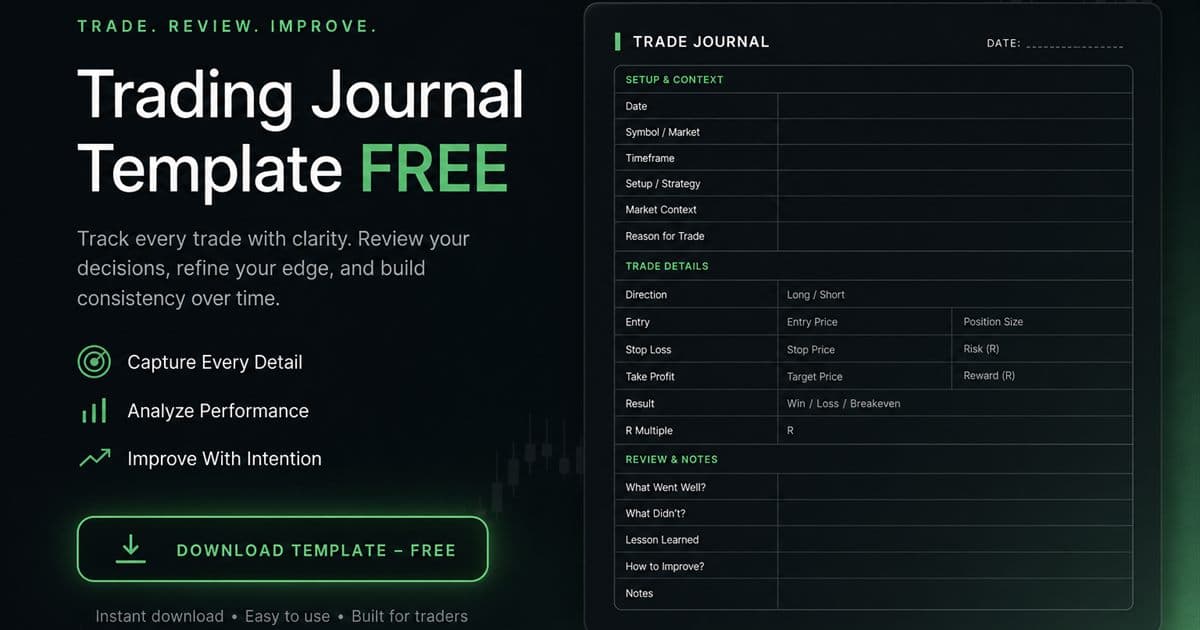
Use a short trading journal template: date, symbol, direction, R risk, setup, emotion, screenshot, outcome, lesson. Excel works until screenshots and filters hurt — then move the same fields into software.
A trading journal template is a contract with your future self. If filling it takes longer than reviewing it, the template is wrong — not you.
Canonical columns (Excel / Google Sheets)
- A: Date
- B: Session
- C: Symbol
- D: Direction (long/short)
- E: Risk_R
- F: Setup
- G: Emotion
- H: Screenshot (URL)
- I: Result_R
- J: Lesson (≤140 chars)
Excel formulas that actually matter
- Total R: =SUM(I:I)
- Win rate: wins / non-blank Result_R
- Pivot: Setup × average Result_R
- Pivot: Emotion × average Result_R (this is where FOMO shows up)
When the template should graduate
Graduate when you need AI-assisted field fill from charts, calendar heatmaps, or emotion/setup filters without building a second spreadsheet brain. Keep the same mental model of columns — software should feel like the template with less typing.
Frequently asked questions
Trading journal Excel template — what formulas?+
Sum of R, win rate by setup (COUNTIF), and average R by emotion tag. Skip vanity dashboards until you have 30+ rows.
Do I need a forex-specific template?+
Add session and pair; keep the same core fields. See the forex trading journal guide for session tags.
Related guides
- Best Free Trading Journal: Template First, Then Upgrade
Honest free trading journal options — spreadsheet template, free tiers, and when paying for screenshot software is cheaper than broken habits.
- How to Review a Trading Journal Weekly
A 30–60 minute weekly review checklist that turns trade logs into next-week rules.
- Forex Trading Journal: Sessions, Spreads, Screenshots
How to journal forex trades properly — London/NY sessions, pair tags, spread costs, free template fields — and when screenshot software helps.
- Trading Journal Guide: Template, Excel & Software
Complete trading journal guide: what it is, why it matters, templates, Excel, and journaling software.
Same fields, less typing
Bring one screenshot into TradeLogger and map it to these columns automatically.
Start free