Integrations · 5 min read
The 212 Trading Journal: My Honest Look at the Screenshot Workflow
A Guide to Creating a Trading 212 Journal: Tracking Chart Screenshots, Using Verified Fields, Standardizing Tags, and Implementing Calendar Reviews—All While Avoiding Claims About Unsupported API Sync.
Updated 2026-07-30 · TradeLogger Research
Quick answer
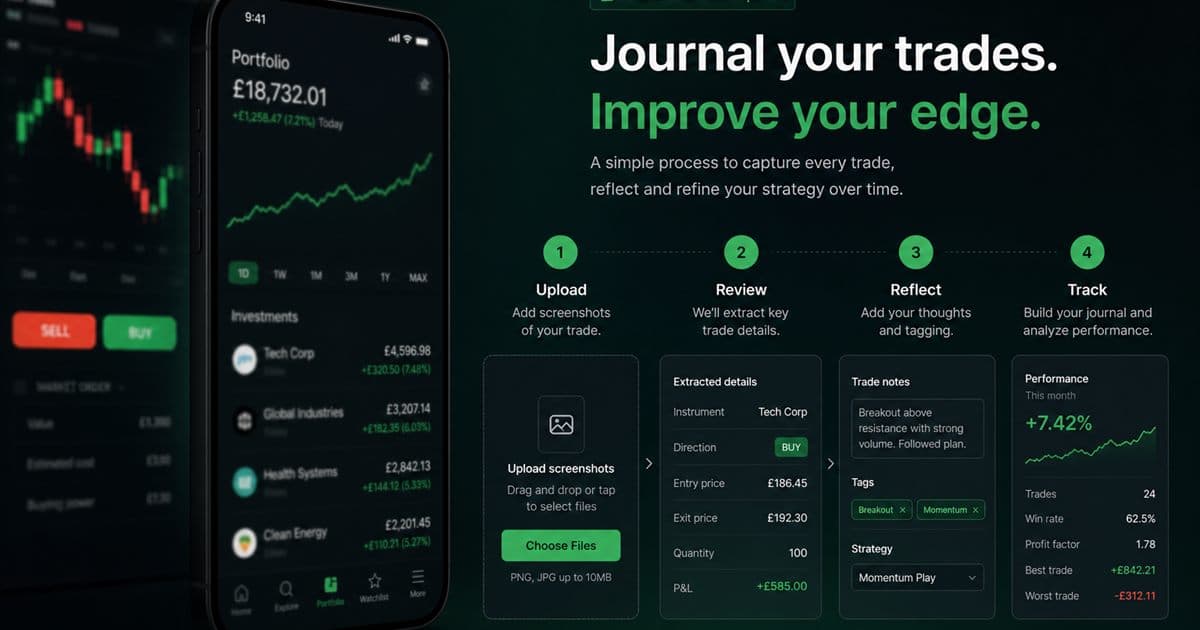
TradeLogger allows you to journal your Trading 212 trades using screenshots of your Trading 212 charts. The process is straightforward: you upload the image, verify the extracted fields within an editable row, assign tags, and finally review the trade using the calendar function. Be aware, however, that this tool does not provide official Trading 212 API sync.
TradeLogger does not offer Trading 212 API sync. Journal from the screenshot: upload the chart, confirm drafted fields, add tags, review in calendar. Less automatic than broker sync; it keeps decision context that fill imports miss. This how-to sits under TradingView, OANDA, and cTrader journal integrations and the foundational guide to trading journals.
Workflow Capabilities and Limitations: What It Handles and What It Doesn't
While screenshot extraction helps cut down on retyping data visible on a chart, it's crucial to understand what this process *doesn't* provide. It is absolutely not direct access to your Trading 212 account, your orders, balances, or private transaction history. Furthermore, an annotated or cropped image cannot guarantee that every single correct field is captured. Therefore, you must still be responsible for verifying the symbol, direction, times, prices, size, fees, and result directly against your official Trading 212 record.
Mastering the Trading 212 Journal Workflow: A Step-by-Step Guide
- Start by pulling up the Trading 212 chart or position view—whichever one gives you the best picture of your decision context.
- Make sure you pin down the instrument, the specific timeframe, the price action, and all crucial marked levels.
- Just drop your screenshot into TradeLogger, and then you’ll need to wait for it to complete the proposed field extraction.
- Check the editable row. Before you save, make sure to correct any missing or misread values.
- Add a setup tag, execution tag, emotion, and a short lesson.
- You need to cross-reference the precise trade details—the fills, quantities, and associated costs—against your complete Trading 212 transaction history.
- Each week, make sure you are running a calendar and tag review. This is key to comparing similar trades effectively.
Getting a High-Value Screenshot: Practical Tips for Capture
To make an image useful, focus on the specific chart area you used, not just the final P&L. Try to keep the instrument and timeframe visible whenever you can. Make sure to include the entry region, the invalidation level, the target logic, and enough preceding price action to fully explain the setup. If a single image isn't able to show both the higher-timeframe context and the actual execution, then save two. Also, never expose account numbers, personal details, or any other unrelated balances.
You'll need to manually double-check the following data fields.
- You need to specify the instrument's name or its ticker, as well as confirming if the trade was placed long or short.
- We meticulously track several key metrics: the initial entry, any partial exits, the final exit, the total quantity traded, and associated timestamps.
- The initial stop and planned risk must be accounted for, even if they aren't visible directly on the chart.
- The relevant factors could include currency conversion rates, the spread, commissions, or any other associated costs.
- The final result will be delivered in account currency and R, calculated according to the original planned risk.
- Does this screenshot depict the plan, the execution, or a post-trade review?
Remember, this verification step is absolutely critical. What you are pulling out is an extraction—a draft, not a final account statement. Keep in mind screenshots might miss partial fills, or the displayed average price could differ from the official transaction history. For precise accounting, always treat the broker’s records as the ultimate authority; the screenshot should only serve as evidence of the chart context.
The tags that enable Trading 212 trades to be found.
If you trade through multiple brokers, you need to add a specific broker tag—like “Trading 212”—and keep that tagging consistent. Make sure those broker tags are always kept separate from your strategy tags. A practical trading journal should track the broker, asset class, setup, holding period, market condition, and execution quality. Don't create a new synonym every single week; stability in your labels is what ensures your future filters are trustworthy.
We're diving into the weekly review here, but keep in mind we completed this without the broker sync.
Before you start, compare your journal count against the Trading 212 history. This step is crucial so that any missing trades don't bias your sample. Next, filter your data either by setup or by holding period, and then carefully inspect the entire process *before* you look at the P&L. Use the calendar to identify these behavioral clusters: things like overtrading right after a loss, making repeated entries in a short time, or simply skipping screenshots on busy days. Finally, select one specific, measurable behavior that you will focus on for the following week.
OANDA: A Deep Dive into Where They Excel, and Where They Fall Short.
TradeLogger includes an optional API integration with OANDA, which is used solely to provide connected account performance context. It is important to note that this feature does not link up to a Trading 212 account, pull in Trading 212 orders, or convert a Trading 212 screenshot into official broker data. If you are a trader using Trading 212, you should anticipate needing to handle screenshot capture and manual confirmation unless the product’s specific capabilities are officially updated.
Is screenshot journaling genuinely enough for serious analysis?
When you consistently pull in the exact facts from broker history and maintain the chart context, this data can certainly suffice for discretionary review. Just be clear: it is not a replacement for your official tax records, regulatory statements, or any formal account reconciliation. The real bargain here is control traded for ease of use—you forgo an unsupported integration claim, but gain a durable record you can always inspect, no matter what the broker API availability is.
If this approach aligns with your current method for reviewing charts, TradeLogger simplifies the workflow: just upload the Trading 212 chart, then edit the row, tag the trade, and finally revisit the information in calendar view. Before committing fully, test it with a small sample and determine if it genuinely boosts your completeness, instead of just automatically assuming that automation is superior.
Frequently asked questions
"If you're trying to link your data, the big question is: does TradeLogger actually sync up with Trading 212?"+
TradeLogger doesn't claim to have an official connection to the Trading 212 API. The workflow for Trading 212 instead operates by using screenshots of the Trading 212 charts, which are then subject to field verification and tagging.
What specific data points absolutely need to be captured in a Trading 212 screenshot?+
Include the instrument, relevant price scale, timeframe, entry and exit context, and any chart levels that informed the decision. Add missing transaction facts manually if they are not visible.
Are screenshots adequate substitutes for official broker statements?+
Absolutely not. Screenshots are excellent for capturing the decision context, but if you need the definitive data—the exact fills, quantities, fees, and detailed account records—you must go to the broker history. Always reconcile those two sources when precision is non-negotiable.
Can TradeLogger actually integrate with any specific broker API?+
The codebase features an optional OANDA API connection, offering critical context regarding your account performance. Just keep in mind that this feature does not establish Trading 212 sync, nor does it substitute for your detailed screenshot-based trade notes.
Related guides
- Trading Journal Guide: Setting Up a Review System That Endures
Learn what to record, how to choose between spreadsheets and software, and how to turn trade evidence into a practical weekly review.
- How to Import Trades from TradingView
Journal TradingView trades honestly with a screenshot-first workflow: paste or upload charts, confirm suggested fields, and add setup context.
- TradeLogger Trading Journal App: Workflow, Fit, and Limits
A transparent guide to TradeLogger's screenshot-first capture, editable AI extraction, tags, calendar review, best-fit users, and limitations.
- Trading Journal Template: Excel and Google Sheets Fields
A practical trading journal template for Excel, Google Sheets, or Notion, with core columns, formulas, screenshot handling, and a weekly review routine.
- Connect cTrader to your trading journal with Open API OAuth
Link cTrader through Spotware Open API OAuth in TradeLogger to see balance, equity, and deal-based daily P/L next to your screenshot journal.
- How to Connect OANDA to Your Trading Journal
To connect OANDA, just link it using your API token, and you can monitor everything—your balance, daily P&L, and win/loss stats—right inside TradeLogger.
Journal Trading 212 charts honestly
Upload a chart screenshot, verify the row, and build a tagged review history.
Try TradeLogger